Some teachers can use whole application in Spanish while others use in English. In the same way, some parents can use the application in Italian or any other language. It is very easy with MyKindergarten.Online.
Create your daily template for school-to-parent and parent-to-school communication.
Ensure parents view and send daily information about their child in 20 seconds by just clicking a link in the e-mail sent by MyKindergarten.Online ( without a password ).
For example, if you decide to add diaper information to your communication sheet, just add this information to your template and start to use at the same day.
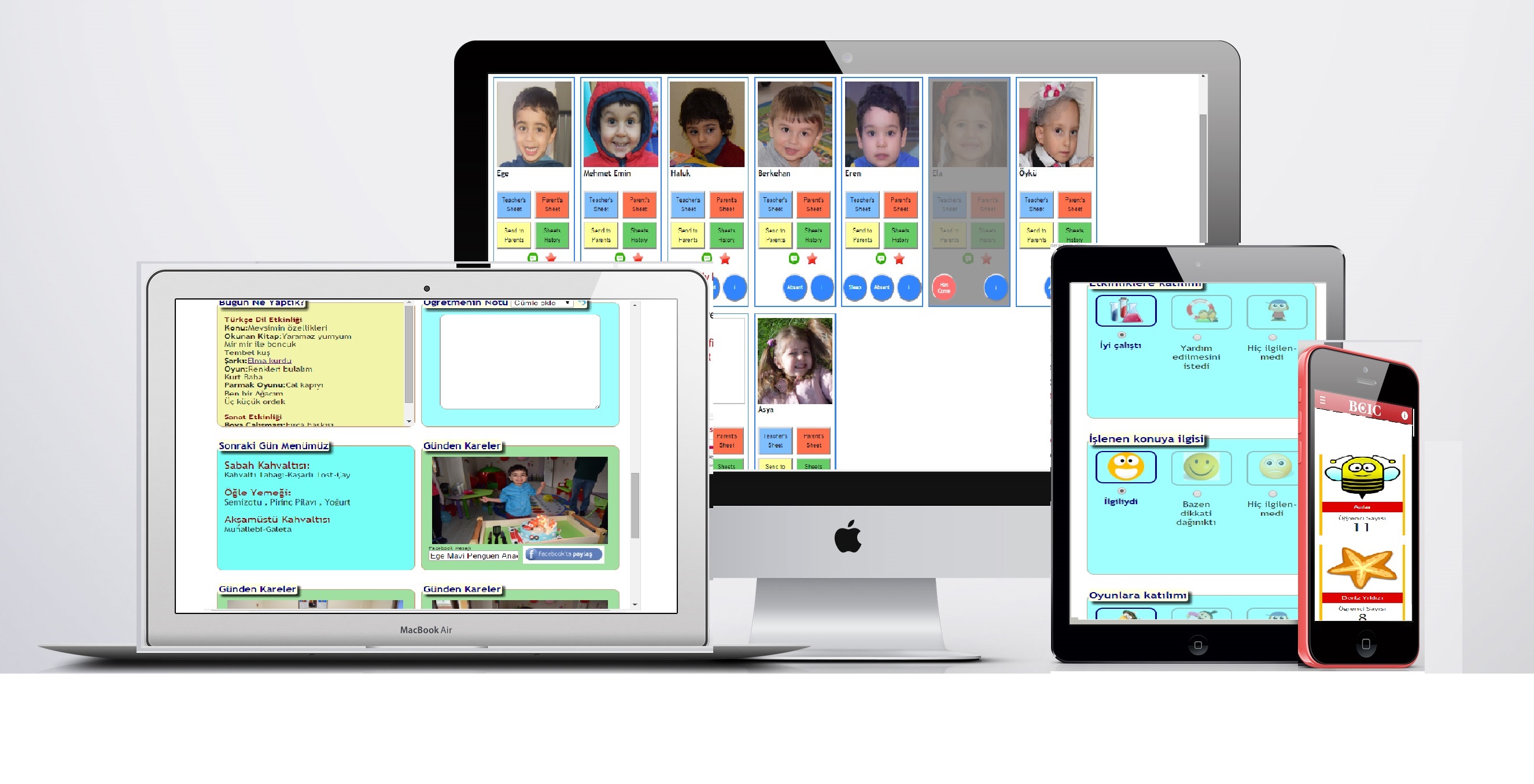
MyKindergarten.Online is compatible to all smart phones, PCs and tablets.
All the teachers and parents can use the application with their smart phones.
Ensure parents archive high resolution photos shared by MyKindergarten.Online.
Carry out your daily attendance list with MyKindergarten.Online.
Send automatically prepared message to parents of students who are absent more than one day.
Create sleeping information automatically by pressing Sleep/Wake Up buttons.
Assign sleeping role to someone and let her/him follow up at a single view for all sleeping children.
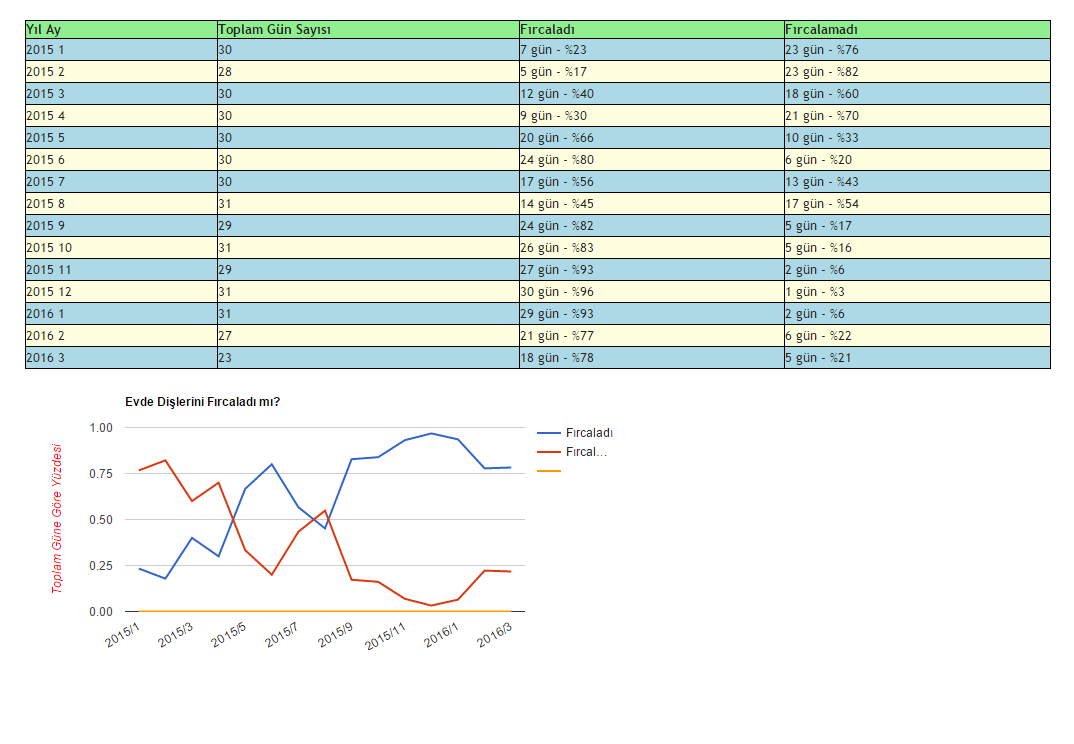
Create monthly graphs for each communication item defined in your template.
You can use the following views for demo kindergarten (SandBox Kindergarten) by just clicking the links in order to inquire more about MyKindergarten.Online application.
Main Features
Click on the titles for details...
 Cloud Software
MyKindergarten.Online application is a cloud software. So you can use MyKindergarten.Online from any place where internet connection exists and any device by which you can connect to internet.
Your teachers can generate daily sheets for each child in less than a minute and they can view daily sheets easily created by parents.
veliler tarafından doldurulan veli günlüklerini izleyebilirler.
Your parents will just click the buttons in the e-mails sent by MyKindergarten.Online applications daily. They do not have to keep a username and password for the application. For example, when they click on the "View Teacher's Daily Sheet" button, they will view the page without any password but in a secure way.
Daily Communication Sheets on Internet
In traditional method, daily sheets are sent to parents by notebooks or paper sheets.
By using MyKindergarten.Online application, you can easily carry out two-way communication with your parents.
You can use the application by your smart phones, notebooks, PCs or tables.
Kindergarten/Preschool founder, manager or any privileged user can see all daily sheets in one screen.
You can create our own daily communication items for school-to-parent and parent-to-school. Create your options and clickable icons for each item and start to communicate with your item set immediately.
You can add new communication items anytime.
Daily Private Photo Sharing
You can share children's photos with only their parents in daily sheets.
Take photos with your smart phones, tablets or even with your professional camera, upload the photos to MyKindergarten.Online application and match children/class with photos.
You can take and upload photos within the application with your smart phones and tablets.
Your parents will see photos in which their child appears and they can upload the photos to their facebook account with one click.
If you take the photos with your professional camera, your parents will have a high resoluton photo archive for their children.
Improvement Graphs and Tables for Children
You can create your own items set for daily sheets. Your teacher or parent will choose an option for each item.
You can also take text feedbacks for each item.
For items having options list, you can generate improvement graphs automatically in MyKindergarten.Online.
Whatsapp like Messaging
You can send messages to a specific parent, all parents in a class or all parents in the school. Your recipients can reply to your message via the appliation.
Parents can also initiate messaging by sending a message to their teachers, psychologist , founder etc.
With MyKindergarten.Online, parents and employees can carry out messaging on their personal e-mail addresses without knowing each others' e-mail addresses.
With MyKindergarten.Online messaging, each message includes all message history via chat-like view.
Periodic Bulletins
Create your periodic bulletins with MyKindergarten.Online.
You can generate HTML documents with all visual elements and attach documents such as PDF, Word, Excel etc.
When you send your bulletins to a specific parent or all parents, they will see the bulletins in their e-mail addresses.
Integrated Meals' List
You can generate your meals lists in MyKindergarten.Online.
In your daily sheets, daily meals items will be prompted to your teachers to choose each child's eating information.
Daily Schedule Shared with Parents
Prepare your daily plans in MyKindergarten.Online. You can generate your daily plan templates for each class and let your teachers
generate their daily plans. Your parents will see the implemented actions in the daily plans in their daily sheets.
You can create look-up tables for songs, rhymes etc. Teachers can choose one of the items in these lists.
Then, parents can view the items with clickable links to youtube videos and repeat the songs with their children at home.
Passwordless but Secure Connection to the Application
MyKindergarten.Online is a two-way communication environment between school and parents.
In order to follow the child's improvement, school should be aware of the child's activities at home.
In traditional methods, parents do not send necessary information for the child's activities at home. Because it will be a difficult process.
With MyKindergarten.Online, parents can click on the options and complete daily sheet in 30 seconds with their smart phones.
In order to simplify the parent's operations, MyKindergarten.Online do not set username/password for the parents.
MyKindergarten.Online simply sends an e-mail to the parents with links to parents' menu items.
Parents just need to click on the links, and directly see the pages which provides school interaction.
With this method, the rate of getting information from parents will increase by 3-5 times.
Student, Class and Teacher Definitions
You can define teachers, classes and students. In MyKindergarten.Online, you can manage daily absence operations and see emergency information with one click.
Incident Reports
Incident management can be done in MyKindergarten.Online. You can define incident priority, choose harmed and harming children and send details to the parents with attachments such as photos, videos etc.
With incident management, you can generate reports about which teachers/students involved in how many incidents.
Emergency Procedures
MyKindergarten.Online provides free usage to interactive flowchart software ( www.brflows.com ) to create your own interactive flowcharts for your emergency procedures.
If wou want, interactive emergency procedure link will be displayed in all pages in the application.
In case of any emergency, your teacher or any other employee can execute the procedures and implement the right actions by passing through the flowchart steps interactively.
Flexible Localization
MyKindergarten.Online is provided in two languages ( English and Turkish) by default. But you can translate all the wordings within application,
and use whole application in your own language. To add a new language, you should simply list all the words in source language ( English or Turkish ) ,
see all words in the source language and set new words in your own language for each of them.
With MyKindergarten.Online, one of your teachers can use the application in english while all other teachers use it in Spanish.
In same way, parents can use the application in their own language.
Attendance Management
In our daily sheet software you can implement your attendance list. When the child arrives to the school, just tap on the child by using a tablet or PC in the reception.
You will keep the arriving time for all children. You can manage attendance for your employees with the product.
When a child leaves the nursery, you will have the option to compare the photos of all possible people who can take the child and
the person who arrives to take the child. You will also keep the leaving time and taking person automatically. Parents can also get notification emails
of leaving details as soon as the child leaved. Leaving details consist of leaving time and taking person.
Meals List
Create your meals list in MyKindergarten.Online and communicate meals with the list automatically. You can also put the link to the meals list in your school's web page.
Daily Sheets
nursery need to implement thorough communication with their parents. Parents want to know all details about
their children in the school. Most preschools exchange daily sheets between parent and school. Filling daily sheets becomes inefficient for many reasons.
Parents do not read and write to the daily sheets since it is noy so easy
The content of daily sheets can not be checked by the manager
The content of daily sheets can not be reportable
Communication Items
Our Daily Sheets software provides nursery an efficient way of sharing detailed information between parents and school.
In our software, each nursery can define their set of communication items ( Daily Sheets ). For example, as the manager of the school,
you can add "Was the child involved in the activities" for school-to-parent sheet. You can set 2 or 3 answer options for the question and optionally add an textbox
to enable teachers to provide detailed information.
As the manager of the school, you can list all the contents of teachers' daily sheet for the whole school daily and check all the content.
This feature helps filling the most accurate daily sheets for the school time.
Managers can also create the graphs for each communication item. For example, you can draw activity involvement graph for each child for a year.
Assuming you have many communication items, you will have graph for all the items. Then, you can correlate one item to the other in the daily sheets.
You can create any number of communication items for your daily sheets as you want. For example you can add another communication item to your daily sheet about the child slept or not.
You can choose predefined communication itemfor your daily sheet as well. For example, you can add predefined communication item for lunch. In this item, dishes
will be listed in the communication item box and teachers will choose by touching "Ate All", "Ate Some" and "Ate None" options.
Other predefined communication items for your daily sheets are Daily Plan, Medication, Daily Photos, Next Day's Meal, Teacher's Notes.
You can also add communication items to your daily sheets for parent to teacher communication.
For example you can add a communication item for when the child slept to fill in every day in the daily sheets.
Parents can answer this question by touching one of the 7 options.
Secure and Passwordless Access by Parents
Your parents will receive an e-mail each day when your teachers complete filling the daily sheets.
All your parents have to do is just click on the buttons in the e-mail.
You can think each e-mail as the menu of your parents. With a complicated id withing the links, your parents will be authenticated to the
system. So, parents can not see the information of other people's childres.
Private Photo and Video Sharing
You can upload the photos and videos with MyKindergarten.Online ( Daily Sheet Software ). You can also take photo within the product and upload it during the operation.
Having uploaded the photos and videos, you have to match photos/videos with children. So, parents will only be able to see their children's photos/videos.
parents can see them in their daily sheets and share them in the facebook by clicking a button in the sheet.
Bulletins
You can reate rich HTML documents ( with images, videos etc) and send all your parents as periodic bulletins.
Medications
Parents can define the medication for any date. Relevant nursery emplloyees will be notified
by a sound and visual notifications to supply the medication to the child. When the medication is supplied a notification email can be sent to the parents optionally.
Attendance Lists
With MyKindergarten.Online ( Daily Sheet Software ), you can implement your attendance list. When the child arrives to the school, just tap on the child by using a tablet or PC in the reception.
You will keep the arriving time for all children. You can manage attendance for your employees with the product.
When a child leaves the nursery, you will have the option to compare the photos of all possible people who can take the child and
the person who arrives to take the child. You will also keep the leaving time and taking person automatically. Parents can also get notification emails
of leaving details as soon as the child leaved. Leaving details consist of leaving time and taking person.
Daily Plans
nursery can create their daily plans with MyKindergarten software.
You can generate daily plan template for each class. Teachers will fill in the daily plans according to the templates daily.
Daily plan will be shared in your daily sheets if you selected "Daily Plan" communication item for your school-to-parent communication.
Teachers will not have to write the same content for each child in the class. For class baased content, daily plan will be entered, and
the content will be put each child's daily sheet.
Predefined Lists for Songs, Videos etc
You can generate lists in MyKindergarten.Online ( Daily Sheet Software ). For example, you can generate songs list and use the list in the daily plan template's songs sang section.
With this way, teachers can choose a song in the listbox. If you add the song with youtube link for example, parents can click on any song and
listen the song with their child.
Messaging
With MyKindergarten.Online ( Daily Sheet Software ), your nursery can implement whatsapp like messaging with
the private e-mail addresses via the application. Your parent do not know your employee's private e-mail address and your employee do not know your parent's
e-mail addresses while implementing messaging with the private e-mail addresses via MyKindergarten.Online ( Daily Sheet Software ).
Incident Management
MyKindergarten.Online ( Daily Sheet Software ) enables you to record all incidents and share them with relevant parents. You can also share incident's photo, video and any documents with the incident.
You can later report all incidents by class, teacher and date. So, you can take approriate actions having studided the reports.
Questionnaires
You can generate questionnaires for parents and generate reports with answers. With our daily sheets software, you can also communicate with your parents with questionnaires.
Emergency procedures
You can generate emergency procedures for your nursery. These procedures may include medical procedures,
earthquake, sabotage and any other procedures. Though emergency procedures are not in the scope of Daily Sheets Software, we embedded this functionality to the software.
Activity Calendar
You can generate activity calendar and MyKindergarten.Online ( Daily Sheet Software ) will automatically send the next day's activity automatically to all parents with an e-mail.
Localization
You can use the product in your own language. Product is available in two languages by default. But you can generate all texts in the product in your own language or wordings.
Kindergarten
Preschools
Nursery
Daycare
The teacher in the school with a kindergarten program, send your message to psychologist and founder.
has eaten, some or has not eaten icons.
Kindergarten mutual messaging software with parents in the preschool program is hosting system. Parent teacher, and the teacher will have the opportunity knowing guardian mail correspondence.
To keep preschool daily sheets software informed about what their children are learning, programs use
The home state of the child to the kindergarten every day over the specified message template.
home visits (or personal visits in a location of the family’s choice)
Parents should not have a separate username and password for preschools, daycares and kindergarten in a preschool daily sheets software. They already keep many passwords and usernames for many institutions.
When you click the nursery children to sleep, woke up hours of sleep when you click the vending machine, paylaşıs your olarakveli k.
As a teacher
handouts and fact sheets
When English Is a Family’s Second Language. For preschool daily sheets software whose home language is not English, programs ensure that staff and preschool daily sheets software can communicate effectively. For example,
regular parent-teacher conferences
When dad came to pick up his son (the boy with two-way communication) he read the incident report and then his temper went off. I had never had a parent yell at me before so I was completely caught off guard. Actually, I don’t think I have had a parent yell at me since. The father was angry about his son being hurt, preschool incident management I let it happen, preschool incident management I didn’t call him, preschool incident management this little boy was allowed to continue going to school there, and the list went on. I just stood and listened to the father as he berated me for being such a failure as a teacher – I didn’t know what to say. The next day, his wife came in and apologized for father’s behavior and it made me cry. The mom said, “When he told me what he had said, I knew it must have hurt your feelings. He was just having a bad day and took it out on you.” I was thankful for her thoughtful words and thankful that she believed I was a good teacher who cared about her son.
Even when your relationship with a parent(s) is warm and positive, sharing the care of a young child often stirs up strong feelings. It isn’t uncommon for parents, at one point or another, to feel a pang of fear that their child might grow to love her caregiver more. They may also worry, at times, that their child’s caregiver is better at parenting than they are. This may be more of a concern when the caregiver is someone the parent and child both know well—a relative, friend or neighbor. Here are two fairly typical experiences that come up when sharing the care:
With Mykindergarten.online, managers can review all daily sheets and find any mistakes in the sheets.
For the development of shared files plotting portfolio. Instant Software by your psychologist Preschool Kindergarten program in the past months the average graphics are displayed.
In a typical year at Rainbow School, children and their preschool daily sheets software speak 8–12 different home languages.
Parent-teacher-school kindergarten Software for the greatest benefit of communication is done through a system of preschool programs that are reportable results. each question used in communications of the child
daily sheets software watches her niece’s son, Eduardo, each day, which she really enjoys. But her niece, Tasha, is often late to pick him up and never calls. daily sheets software is really frustrated and angry. She feels it’s very disrespectful and that she is being taken advantage of. When her niece does eventually show up, daily sheets software is very abrupt and annoyed in her tone. The two adults barely communicate. Eduardo glances from one to the other and looks very tense. Tasha whisks him away and Eduardo doesn’t even say good-bye to his auntie whom he adores.
Preschools , Kindergartens or daycare institutions can use application to manage parent communication in all means.
Also at your historical chart each activity is a click away.
Parents should…
It offers an environment. Kindergarten Daily Sheets This software program is extremely easy to shape into the parent communication.
If a requently harming child exists, you can take specific actions to that child.
Most important: Look for a place to compromise. Ask the parent if he or she has ideas for next steps. What can the two of you agree on? What can you both work on? For example, “We both agree that Erica needs to find other ways to show her anger besides hitting. One strategy that seems to work here is to have her stomp her feet as hard as she can to get her mad out. Are you comfortable with that? I also tell her that if she needs a break, she can curl up on the couch with her teddy bear. Are these strategies you think you might want to try at home?“ (If not, ask the parent(s) what he or she would be comfortable with.)
Kindergarten is a cloud-based software program. purchased like other classic kindergarten programs do not have to install your PC.
Parents do not have time to photograph çocuklarınıjn. as a high-resolution photo of your child with kindergarten professional camera
In the cases where a child is more cooperative with you than the parent, again, help her see it preschool incident management’s perspective: “Yes, two-way communication puts his coat on when I ask him to, but that’s because he knows I have to help the other kids too. Kids learn quickly that the rules and expectations at home and here can be different. He tells me all about how you make sure he is zipped up and how you always check that he has his hat. He talks about you all the time.”
Share-resolution photos.
Kindergarten Daily Sheets Software is a software program used in the web environment. Kindergarten application without entering a password of parents with kindergarten from one medium can enter by clicking the e-mail environment
Step 3: Partner with parents. Developing a plan together with parents on how to handle a child-rearing issue helps you move forward as partners, instead of competitors. For example, if you are trying to teach children not to hit when they are angry, but the parent hits her child to discipline her at home, you can:
Understand that children have greater student achievement when parents work as partners in preschool report’s education.
In the child's activities, "Understanding the Teacher/Parent Communications," the following tips are shared…
website are coming from the same source. So there will be no mistake in the meals list. Teachers will see the dishes in their screens and they only click
Kindergarten, nursery and pre-school kindergarten slots Software kindergarten program and emergency agencies in the event notification software Kindergarten Daily Sheets program follow the procedure can be done with the application mykindergarten.online again.
you can evaulate the teacher about children care. You can rate an incident about teachers fault.
Teachers are able to be reviewed continuously what they write in their daily sheets. With paper daily sheets, this audit is near impossible.
When you have a challenging encounter with a parent, you can use the steps below to get things back on track in order to provide the best care for the child you all care so deeply about.
conversations at drop-off and pickup times
The parent/daily sheet
Dedicated space inside the entry area of Sheltering Arms Early Education and Family Center–International Village provides stroller and car-seat parking, convenient for preschool daily sheets software who walk and those who have different people drop off and pick up their child.
phone conversations (although not face-to-face, these can be a valuable supplement or alternative when families’ schedules do not allow them time to talk in person)
Offering parents opportunities to get involved in the classroom experience
daily sheets software got into her car, really angry. When she dropped off her 20-month-old, Malika, that morning, she mentioned to her friend, Angela (who cares for Malika), how impossible Malika has been in the mornings. She drags her feet, doesn’t want to get dressed, pitches a fit about which outfit to wear—it’s been practically impossible to get her out the door. Angela seemed really surprised. “Wow, she is an angel here. I tell her it’s time to go out and she runs over to the coat hook, pulls down her coat, and puts it on. She is really cooperative.” daily sheets software thought she’d be relieved to hear how well-behaved Malika was, but instead found herself wondering if this means she is not as good at caring for Malika.
Preschool nursery and kindergarten teachers Software enters kindergarten program slot with the application mykindergarten.online daily plans and daily plans are shared with parents instantly.
Be supportive and get involved in your child’s learning experiences or classroom in whatever way you can.
make requests via the internet to access information in a very easy way kindergarten Software is forcing a solution in the form of preschool program.
Teachers or any preschool daycare pr kindergarten employee can access interactive emergency procedures. For example, if a child faints, teacher or anyother employee will just click on the interactive emergency procedure, he/she will access fainting procedure with just 2-3 clicks and take appropriate actions about fainting. Interactive procedure will ask questions about child's case, by answwering the questions you will pass through the right actions for that case.
I was left standing there and I could feel my guard shoot straight up. I didn’t like being spoken to like a child. I didn’t like having another adult think that she had the right to tell me what we could or could not do. I didn’t multi-language like someone else believed she trumped me as a parent. I didn’t like having a perfect stranger bossing me and daycare center reports around. I didn’t multi-language disrespected. I didn’t like not having a chance to tell her that we were aware of the rules but just taking a quick tour. As of that moment, I didn’t like the teacher and I wasn’t so sure I liked the school either.
Thus kindergarten psychologists will be able to make better decisions about the development status of the child.
Written Communication. At times, of course, early childhood education programs communicate in writing through letters and forms sent home in the child’s backpack. Programs emphasize use of open-ended terms inclusive of all family constellations, such as adult/guardian or domestic partner. If requested, some programs provide separate mail pockets and duplicate communications for divorced or separated parents who share child custody.
Have conversations with parents rather than just give reports to parents about preschool report
Prechools, daycares and kindergartens provide daily sheets to parents for daily communication. They provide daily photos, information about daily schedule, songs rhymes and clickable links to youtube for these songs and rhymes for parents to see and learn the songs and rhymes and repeat them with their children.
emergency procedures has a family room with sofa, tables and chairs, a computer with Internet access, a bulletin board, and even a kitchenette.
Creating truly welcoming and engaging environments for preschool daily sheets software is at the heart of establishing effective communication. When preschool daily sheets software feel welcomed and accepted by a program, they are more likely to become actively engaged. Programs often ask preschool daily sheets software about their preferred mode of communication, then communicate with preschool daily sheets software in the way that works best for them. Several programs document their formal and informal contacts with families—for example, The Family Schools uses an “Orange Book” documentation system to help catch preschool daily sheets software who may be falling through the cracks.
Step 2: Look at the interaction preschool incident management’s point of view. Tuning in to the child’s experience can reduce tension and lead to joint problem-solving. Take the example of a child throwing a tantrum when his parent comes to pick him up. This situation can naturally make a parent feel incompetent and embarrassed. But if you look at it preschool incident management’s point of view, you can reframe the issue in a way that doesn’t make the parent feel bad and that also helps him or her understand the complexity of the child’s behavior: “It seems like Stephanie is trying to tell you, I’m having so much fun with the dollhouse that I need a little time to adjust to the idea it’s time to leave for the day.”
Each program identifies and hires bilingual staff members, often encouraging parent volunteers to grow into assistant teachers and then teachers or family workers.
draws and only share photos of their children with every velda Kindergarten Online uygulamasıjn.
Parents would like to know what their children ate in the lunch. They can see in the application. Meals list in the application and
Use “I” statements: I know we are both concerned about Erica hitting other kids when she’s here. I really work with the kids on finding other ways to show angry feelings. I don’t hit them because when adults hit children when they are angry, it teaches children to hit as well when they are mad.
Incident management in kindergartens, daycare services or preschools is very important for teachers and children involving in the incidents.
You will send e-mails with links every day. E-mails include menu for the parents. Parents will just click on the buttons and access pages without entering any password.
bulletin board posts
As a child care provider, you soon discover that developing positive relationships with parents is critical to providing the best care possible to their children. Here are 3 key steps to follow when having difficult conversations with parents.
After I went back and listened to both of these child's activitiess I was reminded of some of my own experiences as both a parent and as a teacher that I thought I would share with you…
You pay a price commensurate with the number of active students kindergarten program.
Kindergarten program makes the software very easy to communication parents. In the nursery is used effectively in the slot, the system automatically works in the hours of sleep of children.
If you are running a daycare center, preschool or kindergarten, you must be prepared in any emergency case. You must have procedures and
What it means: Communication takes multiple forms and is responsive to families’ linguistic preferences. Communication is both school- and family-initiated and timely and continuous, inviting conversations about the child’s educational experience as well as the larger program.
Kindergarten program should provide the parent communication.
About a week before school was to start, I took daycare center reports to visit her new school – she was entering the first grade. We wondered around the school and found her locker, her classrooms, and the cafeteria. We didn’t dress in school clothes for the visit, instead we wore shorts and t-shirts. As we were preparing to leave the school, a teacher saw us from preschool emergency procedures hall and called out to get our attention – there was no one else in the building. daycare center reports and I looked preschool emergency procedures hallway at a teacher standing there with not-so-friendly body language. The teacher proceeded to give us a lecture on how shorts were not allowed in school and walked away.
log books
Kindergarten and pre-school and kindergarten slots software Kindergarten Daily Sheets Software program allows you to give one-touch information about a lot of parents, parents with only children to private high
My kindergarten to kindergarten automation can use online application, students, parents, emergency, class, include the teachers and attendance information.
you must easily execute these procedures when needed. With mykindergarten.online, you can create your interactive emergency flowcharts and
Finally, don’t forget to check in. A relationship is a living thing that grows and changes over time. It’s important to check in with parents to see how things are going, how your agreed-upon plan is working, and where you might need to make some adjustments. Communication is the key to making any partnership work.
Daycare centers, preschools or kindergartens are the places where some children are for most of their time. So snapshots can be recorded with professional camera
Teachers can send information about incidents with low, medium or high priority, with details and photos. Incident repırt will be instant while daily sheets are at the end of the days.
student records can be tracked. Payments are made as follow Vending Software Kindergarten Daily Sheets program.
All activities during the day with students and parents to the kindergarten application mykindergarten.online your smart phone, the PC or tablet
You can also get reports about which children were harming and harmed between two dates.
Be genuine and approachable.
mykindergarten.online the application software in rare Kindergarten Daily Sheets Kindergarten application program appears weeps in the flow of information from the parents. Parents, as can monitor the status of children in kindergarten
Many programs go above and beyond to ensure that preschool daily sheets software have both the time and the desire to spend time in informal conversations with staff and with other families. Some programs provide free or low-cost meals and child care at meetings or schedule events at times that are convenient for families—often right at pickup, or sometimes midday. Many programs create a welcoming space preschool daily sheets software can use. For example,
Kindergarten Daily Sheets book communication with vela Software serves the preschool program exchange. the spread of Internet technology today, parents of children in kindergarten on time
orientation events and/or individual intake sessions
Kindergarten programs can use the monthly rental system. You pay as long as you use the program.
The easily share high-resolution photo above with the kindergarten program.
But sometimes you already have a relationship with the child’s parents—they may be related to you, live in your neighborhood, or be friends or acquaintances. This can be a real benefit since you might already share an open, trusting relationship with the parents. But this familiarity can also raise some challenges when you are caring for their children.
Pre-school education, housing, day nurseries and kindergartens in every state in contrast to the primary school children are curious by parents.
Online Communication. Many staff and preschool daily sheets software also rely on the convenience of online communication like e-mail and online communities to support family engagement goals. Programs determine whether preschool daily sheets software have easy access to the Internet or e-mail before relying on this method. Some of the most common forms of online communication include a detailed website sharing information about the program, regular e-mail to families, listservs, blogs, social media, and photo sharing. For example, The Family Schools keeps a digital camera and a laptop in each classroom. Near the end of the day, teachers upload photos, which parents view as a slide show at pickup time. At the end of the year, teachers give preschool daily sheets software DVDs of photographs documenting the school year documenting the children's activities, or they print and place photos in a keepsake album.
Kindergarten Daily Sheets Software program works in a web environment uses cloud technology.
I will let you go and take a listen to the two shows so you can draw your own conclusions on the perspectives that are shared.
It offers all kinds of communication can install software.
Parents and children are a two-for-one deal: Developing positive relationships with parents is critical to providing the best care possible to their children.
Know what things that you can do at home to promote academic development.
Kindergarten meet slot as nursery and preschool educational institutions, software and web application needs is an application for making communication parents of a paperless environment.
Photo sharing is an especially useful tool for sharing with preschool daily sheets software whose home language is not English. At Rainbow School, teachers share photographs, audio recordings, and videos of children with preschool daily sheets software during conferences. preschool daily sheets software are thrilled to see and hear what their children have been doing and saying at preschool, and teachers are better able to share their interpretations of each child’s development when sharing photo, video, and audio anecdotes.
Ask for the parent’s perspective: Clarify the parent’s feelings and beliefs on the issue. Ask questions to learn, not to pass judgment: “What are acceptable ways to you for Erica to express her angry feelings? What do you do at home? What do you find works? What doesn’t work? Would you be open to finding ways to discipline her other than hitting?”
If you are still filling daily sheets , you are doing this operation like sending mail to someone with paper.
any of your employees can pass through the steps of these interactive flowcharts.
Early childhood is a critical time in a child’s preschool incident management learn to understand the ages and stages of a child’s development.
swap books with their parents will result in the waste of paper. Parents and preschool software program for kindergarten teachers will be difficult to fill these notebooks hampered information sharing.
and can be shared with parents in their daily sheets.
Teachers and programs engage preschool daily sheets software in two-way communication
When I first started teaching, I had a child in my four year old class who constantly picked on others. On one particular afternoon, this little boy threw a toy and it hit another child in the head. Needless to say, it left a nice little bump. I wrote up an incident report, put some ice on two-way communication, gave out hugs, gave stern looks for misbehavior, and had a long serious talk about how we must play safely with our toys. It was handled the best way possible and we all went on with our day without any further incidents.
Communicating with Parents: 3 Key Steps for preschool daily sheets software
Information in daily sheets must be accurate and must be conveyed very fast.
Mykindergarten.online to communicate with the parents of Kindergarten Daily Sheets software kindergarten program implementation follow its own internal information, but they can keep in the forefront
Get connected with others – don’t isolate yourself.
Parents will install the photo archive on the computer or automatically dial one wants their facebook account.
BlueSkies for Children has an outdoor “transition zone” where preschool daily sheets software are encouraged to visit with one another. The area is well equipped with a basket of books and toys, which staff members take in at the end of the day.
daily sheets software. Meeting face-to-face is one of the best ways to forge a relationship. Some of the most common methods the programs use include
daily or weekly reports
Step 1: Notice how you are feeling. Tuning in to your feelings is very important. When you’re not aware of them, they often rear their ugly heads in ways that can interfere in building strong, positive relationships with parents.
Teacher’s can help build the parent/daily sheet by…
newsletters
The parent/daily sheet can be complex, simple, unpredictable, inspiring, stressful, rewarding, delightful and painful. Entire books are written on the subject and it is often a topic of discussion – even on child's activitiess. This is because parent/daily sheets are important. Both parents and teachers have to figure out how to work together and overcome obstacles that get in the way. preschool emergency procedures parent will preschool emergency procedures to do be a partner in preschool report’s preschool incident management preschool emergency procedures teacher will feel confident in the process either. So my advice is to keep trying so you will grow and learn how to build the parent/daily sheet. Don’t let one angry father make you a bitter teacher and don’t let one bossy teacher make you a bitter parent.
So, teachers will be more accurate in filling sheets, and information in daily sheets will be as accurate as it can be.
All of the students in your home altivite psychologist teachers and school management screen.
Recognizing the impact on Eduardo, daily sheets software decides to talk to Tasha about her feelings and to see about making a plan to help Tasha arrive on time, and at least to call to let daily sheets software know she is running late. When daily sheets software takes the approach of partnering with Tasha in solving the problem, versus blaming her, Tasha is open to discussing solutions.
As a parent
Mary'sthoughts on building parent/daily sheets
Don’t think you have all the answers – parents have much to contribute about preschool reportren’s lives too that may help you preschool emergency procedures best to teach preschool report.
Building the parent/daily sheet
View parents as an important part of the process in educating preschool report
Nursery and kindergarten slots in pre-school to kindergarten through the use of software applications that will be created anaokullarıjn advantage over the other.
mykindergarten.online the program sees a special task in line with arasıjn school parents.
Kindergarten Daily Sheets Software web application program slot nursery and kindergarten of preschool institutions are also used in the management of its internal information. Class definitions, descriptions of teachers,
You have to know how many incidents occurred between two dates. If you know the number of incidents and involved teachers and children,
Aldo stopped by his mother-in-law’s house to pick up his toddler, Blanca. When he tells kindergarten daily sheesit is time to go home, she shouts, “No! Stay with Abuelita!” and goes to hide under the table. After calling to her, Aldo finally had to crawl under there and pull her out. kindergarten daily sheeswas screaming the whole time. It was embarrassing, and made him feel like a bad father—like even his own child didn’t want to be with him. His mother-in-law told him it was just because kindergarten daily sheeshas a hard time making changes. But it still was a rotten way to end a long day.
With incident management, you can share photos with parents about the incident immediately. You can note the priority of the incident.
Kindergarten Software Easily manage your multi-branch kindergartens and kindergarten program.
daily sheets software kindergarten teachers kindergarten program with special passwords they enter by clicking the links if the parents are sent to the email address they enter is an application to their own screen.
Kindergarten web application does not include a password for parents. Parents have a password information flows from parents to school this method is preferred and will significantly reduce the mykindergarten.onl
One of the strengths of the application has taken place in.





 Please send your feedbacks or questions.